
Table of Contents
Q2 2026 Release Notes
April - June 2026
New Features
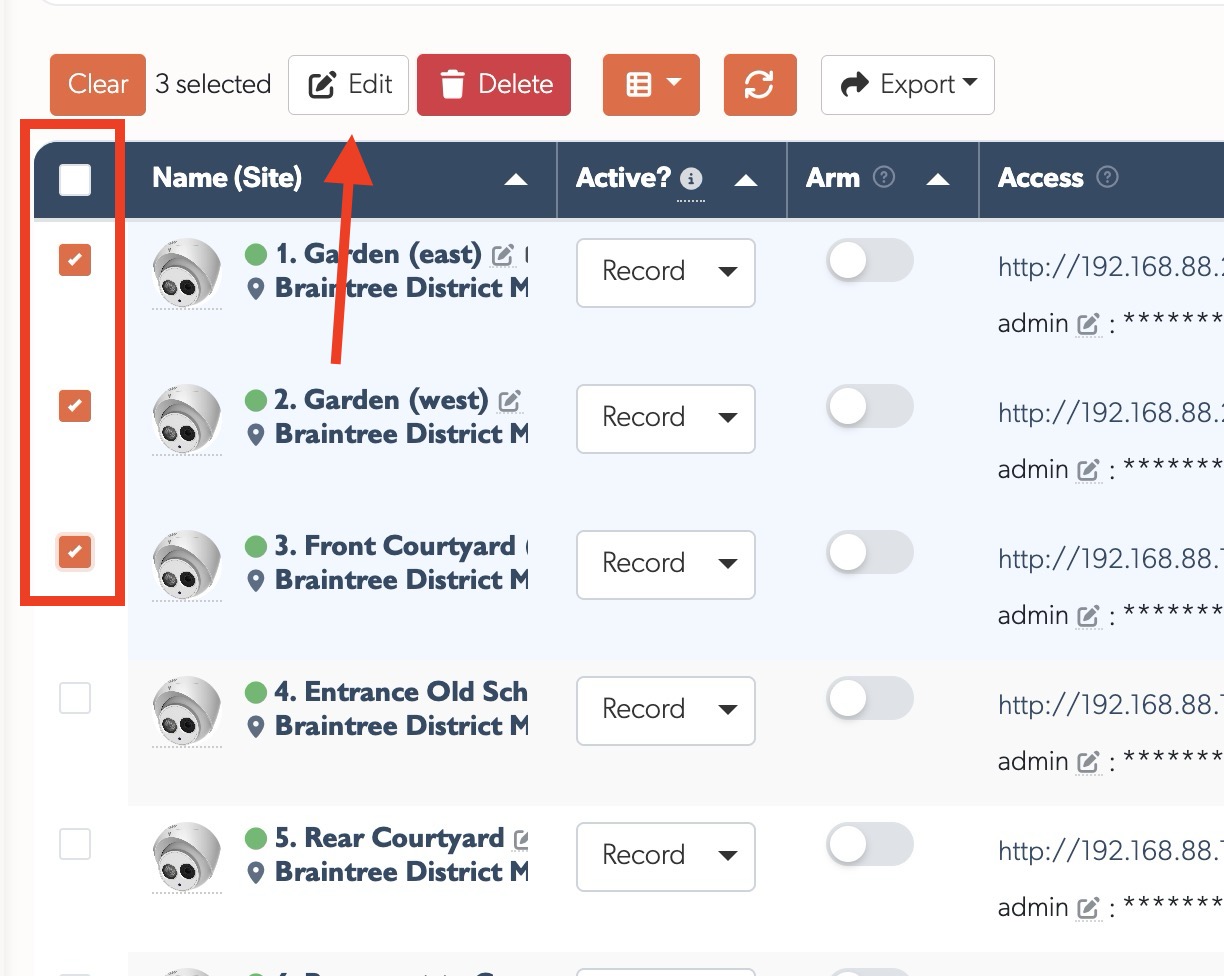
- Camera Bulk Edit & Delete: Select multiple cameras using checkboxes (including select all), then bulk edit settings (active mode, credentials, recording mode, schedule, notifications, and cloud) or delete them in one operation. A confirmation dialogue lists all affected cameras before any destructive action
File Attachments in Notes: Notes editors now support file uploads via drag & drop, paste, or the attach button for images, documents (PDF, Word, Excel, PowerPoint, CSV), and videos (up to 100MB). Attachments display as thumbnails and can be clicked to view full-size. A new management page under Settings shows all uploaded attachments, which resource they belong to, and lets you filter by status (active or orphaned) and file type to find and delete unused files
One-Click Camera Activation: Network devices flagged as requiring activation now show an Activate button next to their IP on the Devices page. A single click sets a secure password and sensible defaults on the camera or recorder, ready to use straight away
Network Tab — Static IP Assignment: Cameras with a working native API and a TetherBox running 6.14 or newer get a Network section on the API tab. Auto-Assign picks the next free address on the private 192.168.88.x network in one click, or fill any of the IP, netmask, gateway and DNS fields manually. Once applied a confirmation dialogue explains it can take up to two minutes for the camera to reboot and reconnect. The Auto-Assign button greys out (with a tooltip explanation) for cameras already on a private static network
TetherBox Uptime Probe Endpoint: New passwordless public endpoint
/api/v3p/tetherboxes/:serial/upthat reverse-proxies through the VPN to the TetherBox itself. Returns HTTP 200 when the box is reachable and its Rails app is responding, or a 5xx error otherwise. Designed to be plugged straight into HTTP uptime monitors such as Uptime Kuma or Uptime Robot without needing an API token or any JSON parsing
Improvements
Static IP Configuration Guide: New help article explaining how to configure a static IP address on a TetherBox using its offline interface. The Internet requirements article, emergency console login article, and FAQ all link to it as the single source of truth
Richer Event Classification (work in progress): Events are being reorganised around fifteen meaningful categories (motion, objects, movement, clothing, behaviours, vehicle, anpr, tampering, environmental, etc.) so you can filter for exactly what you care about. Cleaner notifications (no more stutters like "Motion Detected detected"), a help page that updates automatically whenever a new event type is added, and room for new detections like PPE checks, vehicle violations and demographics
Device Service Filtering: Filter devices by detected service (Web, SSH, Video, VNC, Other) or by specific open ports. Service badges appear next to device names showing available interfaces at a glance
Private/Randomised MAC Warning on Devices: The Devices page now shows an information note explaining that smartphones and laptops with randomised MAC addresses do not appear in the list, with steps for turning the feature off on iOS and Android so a specific device can be monitored
Redesigned Page Loading: Cleaner page load indicator with a subtle indeterminate progress bar and branded loading overlay. Fonts load with higher priority to reduce text reflow during navigation
Exports Page: Exports list rebuilt with the redesigned table format, including sortable columns, search, and column visibility controls
Redesigned Tables: All data tables rebuilt with resizable, reorderable, and hideable columns. Preferences remembered per table. Includes search bar, column visibility toggle, and CSV/Excel export. Formatted columns (CPU usage, storage size, time durations) now sort by underlying values. Name is always the second column and bold for quick identification. Clicking a row opens the detail modal. Related links (company, user, timeline) open in modals instead of navigating away
Clearer Table Loading: While a table loads or re-sorts, the dimming overlay is now lighter so rows stay readable, and the column headers stay fully visible and clickable so you can change the sort without waiting for the load to finish
Camera Avatars: Camera name columns now show a model image (where available) or colourful letter avatar, matching the user and company avatar style. Hovering a model image shows a larger preview. Avatars now also appear on the TetherBox detail page's Cameras tab and the Health page's Cameras tabs
Health Devices with Packet Loss: Added a name column with the connection indicator so packet loss percentage is visible at a glance
TetherBox Devices Tab: Reordered columns so the device name appears before Monitored, matching the layout elsewhere
Notes Improvements: Links and attachment images in note previews (map callouts, event popovers) now open in a new tab or full-size preview instead of navigating away. Images constrained to fit the container. Callouts no longer wait for images to load before appearing
Timelines Index: Added brand column with link to brand detail
Recording Mode Hints: Improved formatting for Active mode and Recording mode tooltips with bold labels and line breaks
DMS Coordinate Support: Site coordinates can now be entered in degrees-minutes-seconds format (e.g.
73°42'14.5"W) and are automatically converted to decimalEvents Date Filter Auto-Apply: Picking a date in the Events filter sidebar applies straight away instead of waiting for the Apply button, with a small clear icon inside the date field to reset it in one click
Exclude Motion Filter: The Events filter sidebar has a new Exclude motion toggle. Switching it on hides plain motion events, both TetherBox motion detection and basic camera motion, along with continuous recordings, leaving only the meaningful detections such as people, vehicles, intrusion, tampering and others. A quick way to cut through the noise on busy sites
Faster Events, Cameras and Recordings Pages: Removed hidden per-row database lookups that accumulated on long lists, so page loads stay snappy as accounts grow
New TetherX AI Help Article: Single page covering on-device video AI (people, vehicles, animals with searchable attributes such as clothing colour, vehicle colour, direction of travel) and audio AI (63 distinct sound types across emergency, alarms, intrusion, vehicles, voice, animals, and weather). Explains the AI capable TetherBox requirement and how cloud backup continues to work
New Camera API Tab Help Article: Documents the per-camera API tab, including ONVIF and native API status badges, the Refresh Capabilities button, the Reboot Camera button (uses the manufacturer's native API where available and falls back to ONVIF SystemReboot, so it works on virtually any modern IP camera and on supported NVRs/DVRs), and the per-stream profile listing
Refreshed Notifications Help Article: Updated screenshots to match the current interface, added a TetherX AI section to "Reducing False Notifications", and clarified that admins now click a user's name to open the unified profile page where every field is edited inline
Refreshed Health Report Help Article: Added the new colour-coded report screenshots inline with the Critical Issues, Suggestions, and Stale Recordings sections so each visual sits next to the matching content
Calipsa and DeepAlert Documentation Moved: The TetherX knowledgebase no longer documents Calipsa and DeepAlert ML integrations, since those are now maintained externally. Both integrations remain fully supported - contact support if you need them
Redesigned Health Summary: The Health page summary tab has a clearer at-a-glance design with a fleet health score ring, a plain-language status headline, and metric cards that jump straight to the matching list when clicked. The timeline filter now stays applied after a page refresh, and the figures count only activated TetherBoxes so units not yet assigned to a site no longer skew the totals
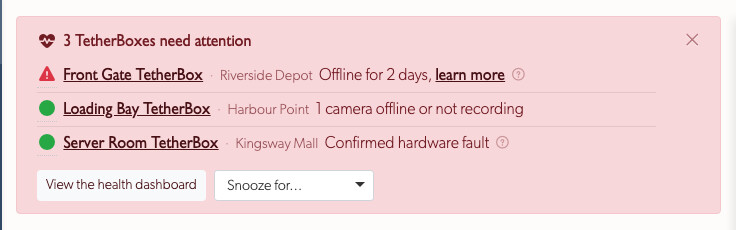
Health Alert Banner: Integrators and staff now see a banner across the top of the events page whenever a TetherBox needs attention. It lists only critical problems, units offline, cameras that have stopped recording, hardware faults and the like, with a link straight to each affected unit. Footage gaps and other non-critical warnings stay off the banner and remain on the unit's Health page. The banner can be snoozed, and an offline unit you already know about can be cleared from it by setting that unit inactive on its settings page
Bug Fixes
- API Reference Dark Mode: The API reference page is now readable in dark mode with a light background container for the Swagger UI
- Modal Background Scroll: Opening a modal no longer allows the page behind to scroll
- Tooltip and Popover Formatting: Fixed missing paragraph breaks in tooltip and popover content
- Column Selector Dropdown: The column visibility dropdown no longer clips behind the table container
- Event Player Stall After Scrubbing: Fixed the event player getting stuck with a permanent loading bar after scrubbing forward. The player now buffers all remaining recording segments instead of only two ahead
- Events Display Mode: The "All" display mode now correctly shows events in all states (pending, hidden, closed) on initial page load, matching the selected filter
- Recording Download for Cloud-Backed Recordings: Fixed Access Denied errors when downloading recordings that are only stored in the cloud
- Event Filmstrip Thumbnails: Filmstrip thumbnails now load directly from cloud storage when available, fixing missing images for older recordings no longer on the device
- ANPR Date Filter: The ANPR page no longer crashes when an invalid date is entered in the filter, falling back to the default range instead
- Filter Defaults: Online and Active filters now default to showing all items rather than only online or active ones, making newly added offline or inactive items visible without changing the filter
- Timelapse and Filmstrip Images: Fixed missing images on the timelapse tab and event filmstrip for cameras with no timelapse cloud backup, a longer backup interval than five seconds, or thumbnail-only backup. The page now loads images directly from the TetherBox in those cases instead of trying a cloud copy that does not exist
- Missing TetherBoxes on Subscriptions Page: Fixed TetherBoxes with no renewal date being absent from the Subscriptions page counts. Activations now always set a renewal date, including for replacement units inheriting from older units that predate renewal dates
- Table Pagination Page Count: Fixed an extra page button appearing on tables that load data from the server (such as the Health page) after switching to a larger rows-per-page size. The row counter and page buttons now stay in sync with the selected page size
- Table Height After Reload: Tables that reload with fewer rows now shrink to fit the new content instead of staying stuck at the previous taller height
- ANPR Pagination: Fixed the ANPR page showing "0 rows" and disabling all pagination buttons despite results being present. Prev/Next buttons now work correctly for large datasets where an exact row count is not available
- Stale Timeline Crash: Pages no longer crash when viewing or deleting a resource whose timeline has since been deleted — permission and audit-session lookups now fall back to the user'''s current timeline
- Editor Attachment Fetch: Fetching a deleted editor attachment now returns a clean not-found response instead of running etag checks against a missing record
- TetherBox Stuck Offline Despite Being Online: Fixed TetherBoxes that could stay shown as offline on the platform even while connected and checking in normally, if a VPN reconnection went unrecorded. The platform now relearns the TetherBox's VPN address from its regular check-ins and corrects the online status automatically, with an hourly safeguard that clears duplicate VPN address assignments
- Delete Confirmation: Deleting items such as zones, timelines, alarms, companies and distributors now shows a clear on-screen confirmation and refreshes the page, instead of removing the item silently with no visible feedback. When a delete cannot proceed, for example a zone still linked to a camera, the reason is now shown on screen
- Health Report Drive Overheating: Fixed the Health Report listing every drive as overheating, including cool drives and drives with no temperature reading. The report now flags only drives genuinely running above their safe operating temperature
- Health Report Packet Loss False Positives: Fixed the Health Report flagging cameras for packet loss when nothing was actually wrong. Packet loss is now listed only when the affected camera also shows footage gaps or recording errors, confirming a genuine connection problem
- Health Report Said All Healthy While Devices Were Offline: Fixed the Health Report opening with "your security system is performing well" while the report below listed offline cameras and devices. Offline monitored devices now count as issues, so the summary and subject line always match what the report shows
- Inadequate Recording Storage Now Flagged: A TetherBox recording cameras with no proper storage drive now raises a critical health alert on the unit page, the events page banner and the email health report. It covers a unit with no storage drive connected, one whose drive has been unplugged, and one whose only drive is too small to be useful. Previously these units, including Raspberry Pi boxes recording onto an SD card, quietly recorded onto storage that wears out within months with no warning at all. The alert says when the drive was last connected and links to guidance on choosing a suitable drive
- Devices Page Hid Offline Monitored Devices: Fixed the Devices page defaulting to online devices only, which hid any monitored device that had gone offline, including the offline monitored devices the Health Report counts and links to. The page now lists online and monitored devices together, monitored ones first, so an offline monitored device is always visible
- TetherBox IP Devices Tab Hid Offline Monitored Devices: Fixed the IP Devices tab on the TetherBox page showing online devices only, so an offline monitored device never appeared even though the Health Report counted it. The tab now lists online and monitored devices together, monitored ones first, and the Total Devices count above the table now matches the rows shown
More Improvements
- Camera Bulk Edit — Custom Paths: Bulk editing cameras now exposes the Analytics Path and Recording Path fields, matching the per-camera edit form
- Devices Page — Private MAC Note: The randomised MAC warning on the Devices page now includes an inline help tooltip with the steps to turn the feature off
- TetherBox Staff View — Partner Price: The TetherBox Staff tab now shows the live Partner Price alongside the manual Invoice Price override, with hover hints explaining which value is used for billing
- Exporting Cameras Help Article: Renamed and expanded with bulk image / snapshot export aliases so searches like "download camera images" and "bulk snapshot export" find it
- Recommended Operating System: Build-your-own TetherBox install instructions and hardware spec doc now recommend Ubuntu 26.04 LTS Server (was 24.04)
- Hardware Help Articles Reorganised: The Hardware Specifications page is now a concise overview with three dedicated companion pages for the detail: CPU Recommendations, Storage Hardware Recommendations, and Raspberry Pi TetherBox. The camera configuration page also explains how the recommended analytics settings affect TetherBox capacity, so the implications are visible where the settings are set
- Storage-Slow Event Indicator: Events recorded while a TetherBox's storage was running slow now carry a dedicated icon on the timeline, so transient storage stalls are visible at a glance instead of silently shortening or emptying the event
Internal Changes
- MongoDB Profiler (staff-only): New
/mongopage captures a window of the mongod slow-query log (local or via SSH) and produces an actionable report — index drop-candidates, mirror pairs, plan instability, in-memory sorts, collection scans, shard-key candidates, and index-declaration drift comparing live indexes against the Mongoid model declarations so changes in code that leave stale indexes behind are caught automatically - Reduced N+1 Queries: Swept event, camera, recording, trigger, zone, item, and permission paths to use cached associations, eager loading, and foreign-key copies — measurably fewer MongoDB round-trips on high-traffic pages
- Index Hygiene: Removed three redundant
itemsindexes and added new composite indexes onitem_anprsanddevicesto serve filtered queries without collection scans Device.prune_private_macs_all/Device.prune_private_macs(timeline): Class methods (mirroring theclear_old_all/clear_oldnaming pattern) delete Device rows with privacy-randomised MACs (locally-administered bit set on byte 0 — Apple/Android/Windows/iOS rotating MACs). Skip any device with an attachedCameraorItemrecord so niche camera hardware that sets the bit isn't accidentally pruned. TetherBox now refuses to create these rows in the first place; this is the cloud-side cleanup for accumulated ghosts.Device.clear_old_allcleanup: Removed threepdebug prints, deadif camerabranch (camera was guaranteed nil at that point becausenext if cameraran above it), and the unnecessarypluck(:id) + Device.find(device_id)two-step. Method now iterates the cursor directly, counts destroyed rows, and prints a final summary.- Trigger pipeline split into per-category models:
Triggeris now an STI parent withTrigger::Vmd,Trigger::AiAudio,Trigger::AiVideo,Trigger::ManualandTrigger::Serialsubclasses. The singleTriggers::Router/Triggers::AudioProcessor/Triggers::LegacyMotionShimchain is replaced by category-specific computer services underapp/services/triggers/ai/and a unifiedTriggers::EventProcessorthat owns the open/previous Event invariants. Newdoc/event-flow.mddocuments the four invariants (≤1 open event per device, device-owned bounds, recordings as evidence, zero gaps) and theEvent.attach_or_createAPI. - Detailed Trigger records — staff toggles: Two new opt-in switches gate per-occurrence Trigger documents while the new pipeline is being rolled out — a cluster-wide toggle on
/settings(Detailed Trigger Records) and a per-TetherBox toggle on the TetherBox Show → Staff tab. Both must be on for a unit's triggers to be persisted; off by default so existing customers see only category icons with zero new database load. - Configurable recording segment duration: TetherBoxes can be moved from the legacy 60-second rolling buffer (≈65 s lag before recordings land in the cloud Event) to 5-second low-latency segments (≈5 s lag, eliminates orphaned/empty events at the cost of more Recording rows). Set via the new Event Flow card on the TetherBox Show → Staff tab.
- ANPR index columns split into per-column partials: Each ANPR table column (vehicle image, plate image, plate metadata, vehicle details, confidence, event) is now a dedicated
_column_*.html.erbpartial underapp/views/item/anpr/index/, replacing one large inline cell template. No user-visible change.
Statistics
| Metric | Value |
|---|---|
| Commits | TBD |
| Lines added | TBD |
| Lines removed | TBD |
| Net change | TBD |