

Table of Contents
HikCentral Integration
TetherX raises an alarm in HikCentral Professional as a generic event: a message sent straight to your control room's HikCentral server, which a rule there turns into an alarm on the operator's screen, with a priority and a camera to open.
This is faster and clearer than the email path, and it is the same detections either way. Two things it cannot do, and both matter when you decide how to set a site up:
- HikCentral cannot receive our verification images. The operator sees the alarm and the camera it came from, but not the frames we captured. Sites that need the pictures keep the email integration running as well, which is supported: a site can report to more than one control room platform at once.
- HikCentral confirms that it received the alarm, and nothing further. It does not tell us whether your rule matched it, or whether an operator saw it. So the first alarm after setup should be a test one you watch for, rather than something assumed.
For a control room that can acknowledge each alarm as it records it, see Patriot Systems Integration.
What Your Control Room Does First
Ask them for three things, in this order:
- Switch the generic event listener on in HikCentral, under System, and use the
HTTPS transport rather than plain TCP. The generic event port has no password of
its own, so HTTPS is what protects the alarm in transit. TetherX will not send to a
plain
http://address. - Give you the address and port their listener runs on.
- Create an event rule that matches the source we send, and decide what it does: the alarm's priority, whether it pops up, and which camera it links to so the operator can open live or recorded video in one click.
They choose the event source, which is the text their rule matches this site by. It has to be different for every site they monitor, or two sites raise the same alarm.
Setting Up a Site
Select the HikCentral tab
Enter the details your control room gave you, then switch the integration on
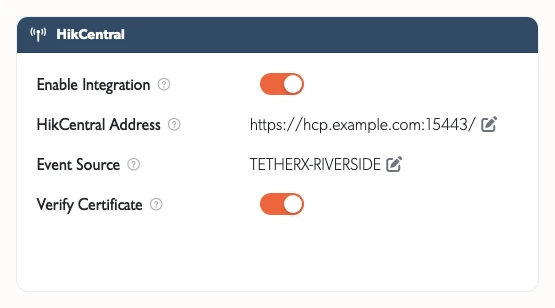
- HikCentral Address: their generic event listener,
https://with the port - Event Source: the text their rule matches this site by
- Verify Certificate: leave this on. Turn it off only if they have told you their server uses a self-signed certificate
- Enable Integration: switch this on last, once the address and source are saved

Each field saves as you finish editing it, so there is no Save button to press.
Once the site is set up, all TetherX AI detections (people, vehicles, animals, glass break, alarms, and more), camera analytics (object unattended, intrusion, line crossing) and VMD Events are raised as generic events.
What We Send
Each alarm is a small JSON message. Your control room's rule can match or read any of it:
| Field | What it holds |
|---|---|
Source |
The event source you entered, which is how their rule finds this site |
Title |
The detection, named the way control room software names it, for example PersonDetected |
Describe |
The same, with the camera name after it |
EventType |
Always CCTV |
Camera |
The camera that saw it |
Site |
The site name in TetherX |
Time |
When it happened, in UTC |
Latitude, Longitude |
The site position, where the site has one |
TetherXSite, TetherXEvent |
Our own identifiers, so support can tie an alarm on their screen back to the event on ours |
An alarm we cannot deliver is retried, and one their server refuses (no listener, or a certificate we will not accept) is reported to us so we can tell you what to fix.
Adding Live Video
- Go to the Control Rooms page
- Copy the URL for each camera, or use Copy All to take the lot as a spreadsheet
- Add the URL to your HikCentral configuration
The URLs belong to the account that copied them and stop working if that account is removed, so we recommend creating a dedicated user for your control room.
Related Articles
- Control Room Software Integration - How the platforms compare and what the integration gives you
- Immix Integration - The email path, which is what sends verification images
- Patriot Systems Integration - Direct integration with Patriot
Referenced in: